Introduction
You invested time, money, and effort into building your website.
The design looks professional.
The pages load.
Your products and services are online.
Yet weeks, or even months, go by, and your website barely appears in Google search results.
If this sounds familiar, you're certainly not alone.
One of the biggest misconceptions among business owners is believing that launching a website automatically means customers will find it online. Unfortunately, that's not how search engines work.
Google doesn't rank websites simply because they exist. Every day, its algorithms evaluate billions of web pages, deciding which ones deserve to appear at the top of search results based on hundreds of ranking signals.
That means your competitors aren't necessarily winning because they have a better-looking website, they're often winning because Google understands, trusts, and recommends their content more effectively.
The good news?
Most ranking problems are completely fixable.
Whether you're running a corporate website, an e-commerce store, a startup platform, or a business blog, understanding why your website isn't ranking is the first step toward improving your visibility.
In this comprehensive guide, you'll discover the most common reasons websites fail to rank on Google, practical solutions to fix them, and proven strategies that can help your website earn more organic traffic, generate qualified leads, and support long-term business growth.
Understanding How Google Actually Ranks Websites
Before fixing SEO problems, it's important to understand how Google works.
Google's process can be simplified into four stages:
1. Crawling
Google uses automated bots, commonly known as Googlebot, to discover new pages across the internet.
These bots follow links from one page to another, constantly exploring new content.
If Google cannot crawl your website properly, it cannot rank it.
2. Indexing
Once Google discovers your pages, it analyzes their content and decides whether they should be added to its search index.
Think of Google's index as an enormous digital library containing billions of web pages.
If your website isn't indexed, it won't appear in search results, regardless of how good it looks.
3. Understanding
Google doesn't just read words.
Modern search engines analyze:
Content quality
Search intent
Website structure
Internal linking
Images
Page speed
User experience
Structured data
Authority
Freshness
Its goal is to understand exactly what each page is about.
4. Ranking
Finally, Google compares your page with thousands of other pages competing for the same keywords.
The websites offering the best overall experience typically rank highest.
That's why SEO isn't about tricking search engines.
It's about making your website genuinely useful, trustworthy, and easy to understand.
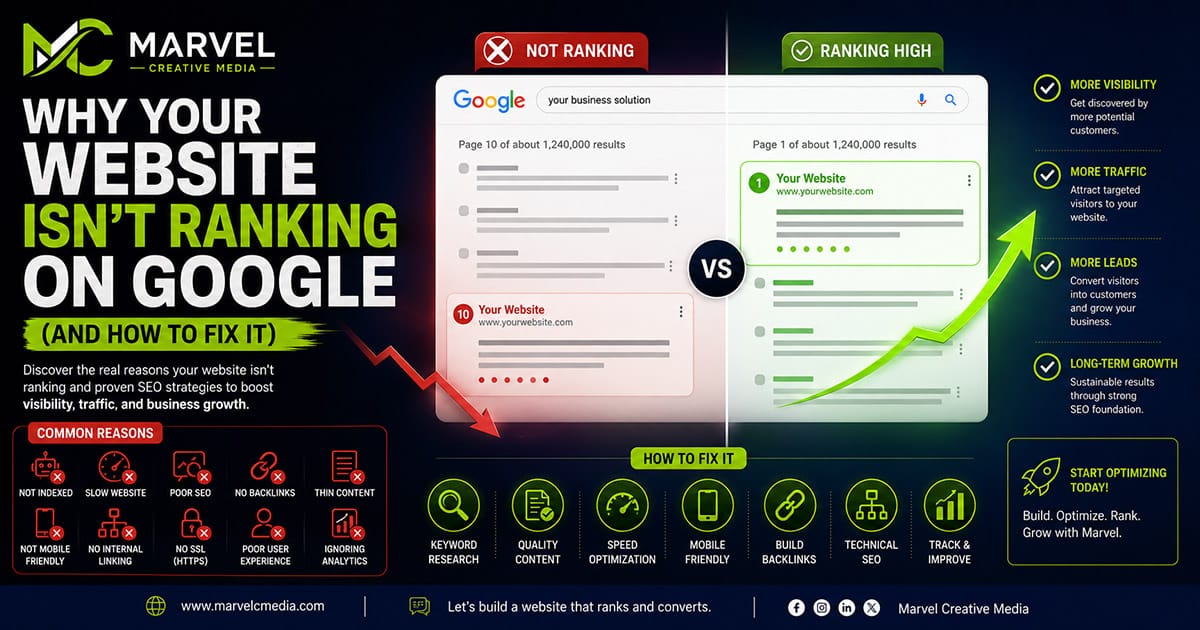
1. Your Website Isn't Indexed by Google
One of the most common reasons websites fail to rank is surprisingly simple:
Google doesn't know they exist.
This happens more often than many people realize.
Your website may not be indexed because:
It was launched recently.
No sitemap has been submitted.
The robots.txt file blocks search engines.
Pages contain a noindex directive.
There are no external or internal links pointing to them.
How to Fix It
Start by checking whether your pages are indexed.
You can search:
site:yourdomain.com
If very few pages appear, or none at all, your website likely hasn't been indexed properly.
Then:
Submit an XML sitemap to Google Search Console.
Request indexing for important pages.
Review your robots.txt file.
Remove accidental noindex tags.
Ensure important pages are linked internally.
Indexing is the foundation of SEO.
Without it, nothing else matters.
2. You're Targeting the Wrong Keywords
Many websites struggle because they're trying to rank for keywords nobody searches for, or for highly competitive keywords they're unlikely to win.
For example:
Trying to rank for:
Website
is almost impossible.
But targeting:
Professional Business Website in Nigeria
or
Full-Stack Web Development Services
gives you a much better chance.
Successful SEO begins with understanding search intent.
Ask yourself:
What are my customers actually searching for?
What problems are they trying to solve?
What questions do they ask before hiring someone?
Long-tail keywords often convert better because they reflect specific needs.
Instead of chasing huge search volumes, focus on attracting the right audience.
3. Your Content Doesn't Fully Answer Users' Questions
Google's goal is simple:
Provide the best answer.
If your content is short, generic, or lacks depth, Google will likely prefer another website that explains the topic more comprehensively.
Great content should:
Answer real questions.
Provide practical examples.
Include useful visuals.
Be well structured.
Offer genuine expertise.
Stay up to date.
When readers leave your page feeling informed, Google takes notice.
4. Your Website Is Too Slow
Website speed is no longer optional.
A slow website frustrates visitors and sends negative quality signals to search engines.
Common causes include:
Oversized images
Poor hosting
Unoptimized JavaScript
Excessive plugins
Large CSS files
Slow database queries
Modern performance optimization includes:
Image compression
Lazy loading
Browser caching
CDN delivery
Code splitting
Optimized fonts
Efficient database indexing
Remember:
Every second saved improves both user experience and SEO.
5. Your Website Isn't Mobile-Friendly
More than half of global web traffic now comes from mobile devices.
Google uses mobile-first indexing, meaning it primarily evaluates the mobile version of your website.
If mobile users experience:
Tiny text
Broken layouts
Difficult navigation
Slow loading
Poor touch interactions
your rankings can suffer.
Responsive design is no longer a feature.
It's a requirement.
6. Your On-Page SEO Needs Improvement
Think of on-page SEO as the language your website uses to communicate with search engines. Even if your content is valuable, Google may struggle to understand it if your pages aren't properly optimized.
Some of the most common on-page SEO mistakes include:
Missing or duplicate title tags
Weak or missing meta descriptions
Multiple H1 headings
Poor heading hierarchy
Missing image alt text
URLs that aren't descriptive
Keyword stuffing
Poor internal linking
Each page on your website should have a clear purpose and target one primary topic.
For example, a page about business website design shouldn't also try to rank for digital marketing, SEO, and branding all at once. Focus helps Google understand your content and improves your chances of ranking.
How to Fix It
Optimize every page by ensuring it includes:
A unique SEO title
A compelling meta description
One clear H1 heading
Well-structured H2 and H3 subheadings
Descriptive URLs
Optimized images with alt text
Naturally placed keywords
Remember, on-page SEO isn't about repeating keywords, it's about making your content easy for both users and search engines to understand.
7. Your Website Lacks Strong Internal Linking
Many websites treat each page as an isolated piece of content.
Google prefers connected websites.
Internal links help search engines discover more pages, understand relationships between topics, and distribute authority throughout your website.
Imagine writing an article about website security.
Instead of ending the article without references, link readers to related content such as:
Website Maintenance
Technical SEO
Website Speed
Business Websites
Website Performance
This creates what SEO professionals call a content cluster.
Over time, these interconnected articles strengthen your website's authority around specific topics.
Benefits of Internal Linking
Improves crawling
Increases page authority
Keeps visitors engaged longer
Reduces bounce rates
Helps Google understand your expertise
Every new article should naturally connect to relevant older articles whenever appropriate.
8. Your Website Doesn't Have Enough Authority
Google values trust.
One of the biggest trust signals is backlinks, links from other reputable websites pointing to yours.
Think of backlinks as recommendations.
If respected websites reference your content, Google assumes your information is valuable.
However, not all backlinks are equal.
Quality matters far more than quantity.
One backlink from a respected industry website is often worth more than dozens of low-quality links.
Ways to Build Authority
Publish original research
Write helpful, evergreen content
Guest post on reputable blogs
Share valuable insights on LinkedIn
Earn mentions in online publications
Create resources people naturally reference
Avoid buying backlinks or participating in link schemes.
Google has become extremely effective at detecting artificial link-building.
9. You're Ignoring Technical SEO
Technical SEO ensures search engines can efficiently crawl, understand, and index your website.
It's the invisible foundation supporting your rankings.
Some important technical SEO elements include:
XML sitemap
Robots.txt
Canonical URLs
HTTPS
Structured data
Schema markup
Clean URL structure
Breadcrumb navigation
Pagination
Redirect management
Even excellent content can struggle if technical SEO issues prevent Google from accessing or understanding your pages.
Conduct Regular Technical Audits
Review your website periodically to identify:
Broken links
Redirect chains
Duplicate content
Missing metadata
Crawl errors
Orphan pages
Indexing issues
Technical SEO isn't a one-time task, it's ongoing maintenance.
10. Your Website Doesn't Demonstrate Experience, Expertise, Authority, and Trust (E-E-A-T)
Google increasingly evaluates content based on E-E-A-T:
Experience
Expertise
Authoritativeness
Trustworthiness
This is especially important for businesses providing professional services.
Ways to strengthen E-E-A-T include:
Publishing original insights
Showing real project experience
Displaying author information
Maintaining an active blog
Citing reliable sources where appropriate
Keeping content updated
Trust is earned over time through consistency and quality.
11. You're Not Using Google Search Console Effectively
Google Search Console is one of the most valuable free SEO tools available.
Yet many businesses rarely check it.
It helps you monitor:
Indexed pages
Search performance
Click-through rates
Crawl errors
Mobile usability
Core Web Vitals
Security issues
Search queries
Instead of guessing why traffic drops, Search Console provides real data.
Regularly reviewing these insights helps you identify opportunities before they become problems.
12. You're Expecting Instant Results
Perhaps the biggest SEO mistake isn't technical.
It's impatience.
SEO isn't advertising.
Unlike paid campaigns, organic rankings take time to build.
Google needs time to:
Crawl new pages
Index content
Evaluate quality
Compare competitors
Measure user engagement
Build trust
Depending on your industry, meaningful improvements may take several months.
The businesses that succeed with SEO are usually those that stay consistent.
Publish helpful content.
Improve your website regularly.
Monitor performance.
Keep learning.
Small improvements made consistently often produce remarkable long-term results.
A Practical SEO Checklist
If your website isn't ranking well, work through this checklist:
Ensure your website is indexed
Submit an XML sitemap
Verify your robots.txt file
Improve page speed
Optimize for mobile devices
Use descriptive page titles
Write compelling meta descriptions
Structure content with proper headings
Add internal links between related pages
Compress and optimize images
Add image alt text
Publish high-quality blog content consistently
Build authoritative backlinks
Monitor performance in Google Search Console
Update outdated content regularly
SEO isn't about finding one magic trick, it's about doing many small things exceptionally well.
Final Thoughts
Ranking on Google isn't reserved for the biggest companies or the largest marketing budgets.
It's the result of building a website that genuinely deserves to be found.
The websites that consistently perform well share common characteristics:
They answer real questions.
They load quickly.
They work beautifully on every device.
They provide valuable, original content.
They earn trust through quality and consistency.
They continue improving over time.
SEO isn't about chasing algorithms.
It's about creating the best possible experience for your audience while making it easy for search engines to understand your content.
When you focus on helping users first, better rankings often follow.
Whether you're launching a new business website or improving an existing one, remember that SEO is an ongoing investment, not a one-time task.